Is Eagle PCB free?
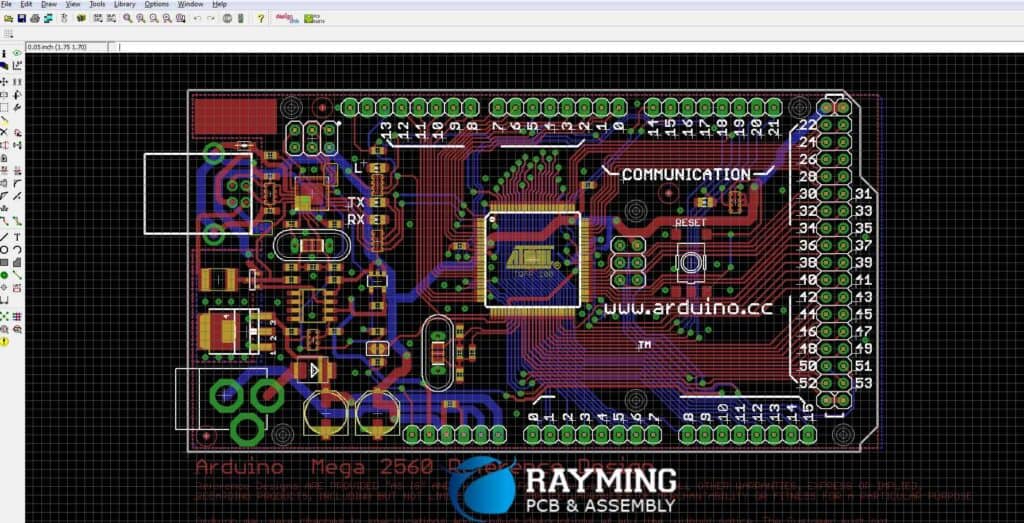
EAGLE (Easily Applicable Graphical Layout Editor) is a popular printed circuit board (PCB) design software developed by CadSoft, now owned by Autodesk. Some key features of EAGLE include:
- Schematic capture editor
- PCB layout editor
- Auto-router for tracing PCB connections
- Support for CAM/Gerber file export for PCB fabrication
- Extensive component libraries
EAGLE offers different licensing options:
Free/Lite Version
- Limited to 2 signal layer boards
- Maximum board size of 100mm x 80mm
- Two schematic sheets
- Very limited component libraries
- No tech support
Standard/Professional Versions
- Unlimited signal layers
- Much larger maximum board size
- More schematic sheets
- Complete component libraries
- Includes tech support
- Additional features like DFM analysis
Below is a comparison table of the capabilities across EAGLE versions:
| Feature | Free | Standard | Professional |
|---|---|---|---|
| Signal Layers | 2 | 4 | 16 |
| Board Size | 100mm x 80mm | 160mm x 100mm | Any |
| Schematic Sheets | 2 | 99 | 999 |
| Libraries | Limited | Complete | Complete |
| Tech Support | No | Yes | Priority |
| Auto-router | No | Yes | Advanced |
So clearly, the free EAGLE software is limited in terms of board complexity, size and resources compared to the paid versions. But it allows basic PCB design which is why it remains popular especially among hobbyists, students and startup firms.
Capabilities Offered in Free EAGLE Software
Although limited compared to paid EAGLE licenses, the free EAGLE PCB design tool still provides sufficient capabilities for many projects. Key features accessible are:
Schematic Design
- Draw circuit diagram with components and connections
- Assign PCB footprint to components
- Electrical rule checking


PCB Layout
- Interactive routing while placing components
- Design rule checks during layout
- Auto-complete signal connections
- Layer support for top, bottom, pads, vias
Library Content
- Set of base components for schematic capture
- Pad/pattern footprint libraries for PCB layout
- Option to create custom libraries
So while the free EAGLE version cannot handle more complex, multi-layer PCB projects, it empowers makers and hobbyists to take early-stage hardware product ideas and design the PCB CAD and layout to get simple prototypes built.
Advanced Functionality with Paid EAGLE Versions
For more advanced board requirements in professional settings, the Standard and Professional EAGLE licenses provide significantly more capability. Some key additional features are:
More Layers and Large Board Size
- Design up to 16 layer PCBs
- Create large PCBs without restrictive size limits
- Critical for complex, high component density designs
DFM Analysis and Cam Processing
- Design for Manufacturing checks
- Facilitate efficient PCB fabrication and assembly
- Auto-generate manufacturing Gerber files
Partial Grid and High Speed Design
- Accurate length tuning with partial ground planes
- Tight impedance control for high speed signals
- Important for RF and analog circuits
Simulation and Auto-routing
- SPICE simulation integration
- Auto-route even dense PCB layouts
- Ensure designs meet timing constraints
Custom Library Management
- Unlimited custom library creation
- Parameterized parts withPaGEagle
- Version control integration
So for advanced electronics design for real-world products across industries – consumer hardware, automotive, aerospace, industrial automation and more – the paid EAGLE software provides the full suite of designing, simulation, analysis, CAM preparation and version control capabilities needed.
Pricing for Paid EAGLE Software Versions
While free for hobbyists, EAGLE does require purchase of licenses for commercial use or to access advanced features beyond the basic capabilities. Here is an overview of EAGLE license pricing:
EAGLE Standard
- $695 base price
- Subscription pricing also available
EAGLE Professional
- $1,895 base price
- Discounted further for multi-year subs
EAGLE Educational
- Special pricing for universities
- 75%+ discount on paid versions
- Free educational license also available
maintenance and expert technical support all come bundled with the paid software licenses. Overall, EAGLE can be considered very affordable for the capabilities it provides even to smaller teams and startups. Educational licenses make it very accessible for students as well.
Is an EAGLE License a One-time Purchase?
Most commercial EAGLE licenses are sold as perpetual licenses, not requiring any recurring payments. You purchase it once for the designated computer activation and own that license with minor updates provided for free.
However, EAGLE now also offers subscription-based licensing:
- Annual contract for rental license
- Includes all updates and upgrades
- Lower cost of entry compared to perpetual
With subscriptions, you pay yearly to maintain access to EAGLE rather than owning it outright. This pricing flexibility allows wider access to professional functionality.
Making the Choice Between Free and Paid
When making the choice between using the free EAGLE software versus purchasing an EAGLE standard or professional license, some key considerations are:
Project Complexity
If you need to design multi-layer boards, implement sophisticated component density, high frequency circuits, simulations etc. then the capabilities only available in paid EAGLE are necessities.
Commercial Use
Selling PCBs designed with free EAGLE or using them in commercial products should prompt purchase of proper licenses. This also provides access to professional output generation and design analysis tools.
Team Collaboration
For enterprise teams working on complex projects, the capabilities like version control integration, custom libraries are best leveraged through the capabilities only available in paid EAGLE licenses.
So while free EAGLE allows you to take a basic PCB design concept and implement an early-stage prototype, developing far more complex PCBs for commercial grade products requires upgrading to paid EAGLE software.
FAQs about EAGLE Software
Does free EAGLE have size or technology restrictions?
Yes, you can only create two-layer PCBs under 10cm x 8cm in size with the free EAGLE. For larger multi-layer boards with high density component placements, a Standard or Professional license is mandatory.
Can I export PCB manufacturing files from free EAGLE?
Yes, you can export Gerber and drilling files to get prototypes manufactured through PCB fabrication partners even with the free EAGLE version.
Does free EAGLE allow commercial PCB design usage?
No, free EAGLE can only be used for personal, educational or hobbyist usage. To sell boards designed in EAGLE or use in commercial products, you must purchase a paid license.
What support options come with paid EAGLE?
Paid EAGLE licenses provide technical support via email, web portal ticket creation, and telephone. So you can get expert assistance when stuck while designing complex PCB projects.
Does EAGLE integrate with version control tools?
Yes, the professional EAGLE license allows plugins to integrate EAGLE design files with version control platforms like Git. This enables streamlined team collaboration and change tracking.